
In development
Your account. Your call on who sees it.
You sign in and everything about your supports is in one place — who's working with you, what they've written, what they've billed, and what you're working towards. Nobody gets access unless you give it to them, and you can take it back whenever you want. If you're a family member or guardian holding an account with someone, or for them, it works the same way.
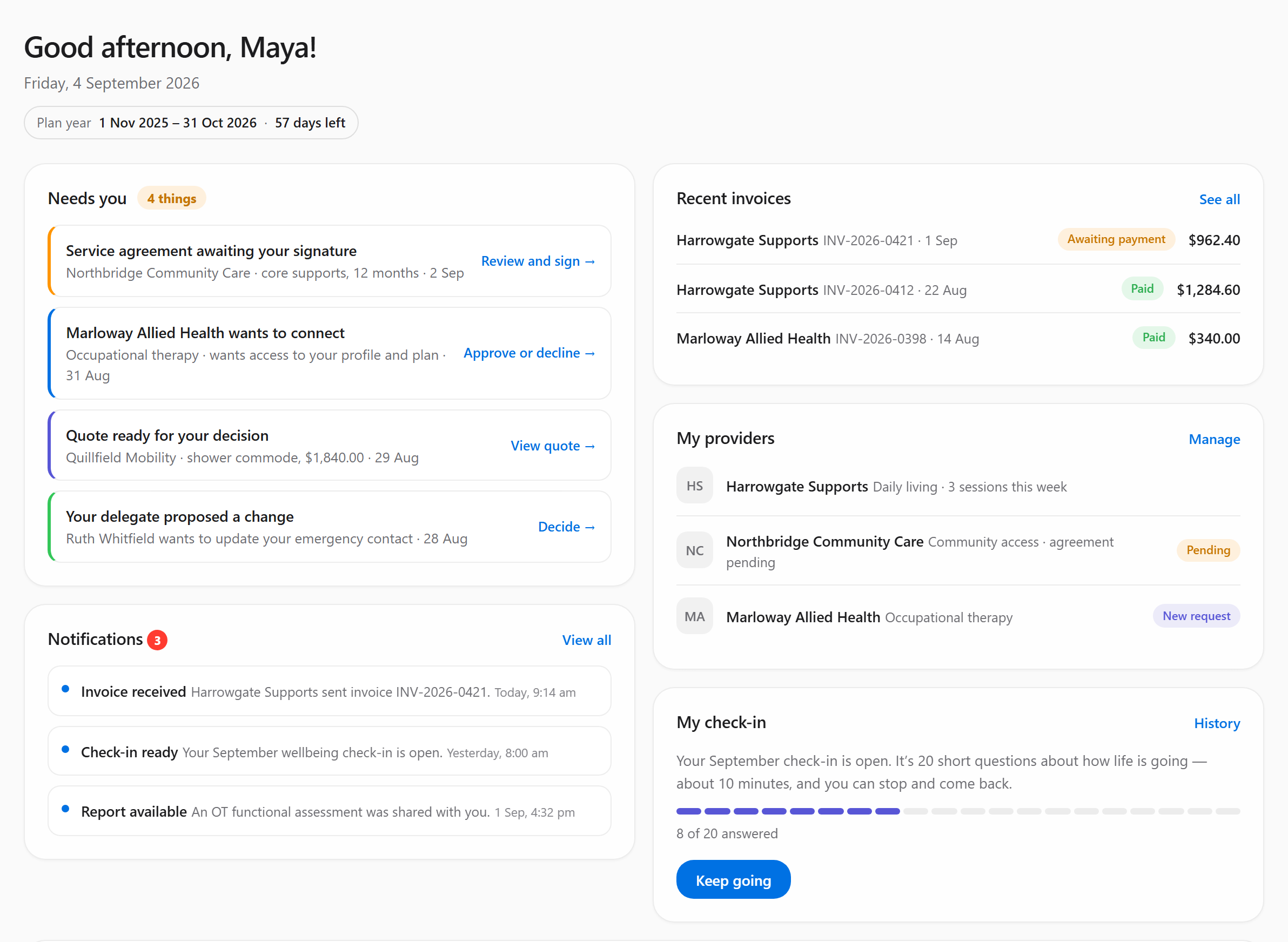
Four things waiting on her, and everything else that arrived this week, on one screen. Fabricated demo participant.
So you don't have to keep starting from scratch
The profile is the part that saves you the most. It's where the things that actually matter about supporting you get written down properly — instead of living in one worker's head until they leave.
- Who Am IWhat you love, how you communicate, what helps you feel your best
- Life StoryWhere you've been, and what shaped you
- Key PeopleFamily, friends, and who to call when it matters
- Health & SupportThe clinical side, with six health domains behind one switcher
- HomeWhere you live, who else is there, what makes it work
- CommunityThe places you go and the people you see
- RoutineHow a good week is shaped, and what happens when it isn't
Everyone who knows you
Some of it you or your guardian write. Some comes from your support workers and practitioners. Some is pulled out of reports and plans that get uploaded — proposed for someone to check, never added silently.
Whoever wrote it looks after it
Every entry records who added it and where it came from. Others can suggest a change, but can't quietly rewrite someone else's clinical entry. You can comment on anything, and flag anything you think is unsafe or wrong.
It outlasts any one worker
The profile is kept for continuity, so it isn't something a single person can empty out — including you. What a departing worker knew about supporting you well is exactly what shouldn't disappear.
Health & Support reads in the order the thinking goes
Aspiration, then obstacle, then resources — ending on the helping note rather than opening on a list of what's wrong. What helps shows both halves together because that's how you'd think about a problem, but they're kept apart underneath: you build a capability and you fund a service, and the NDIS only pays for one of them.
Who Am I works the other way entirely. It doesn't ask about deficits at all — it asks what you love, how you communicate, which decisions you want to make yourself, and what matters to you. A support worker starting on Monday needs to meet a person, not a case.
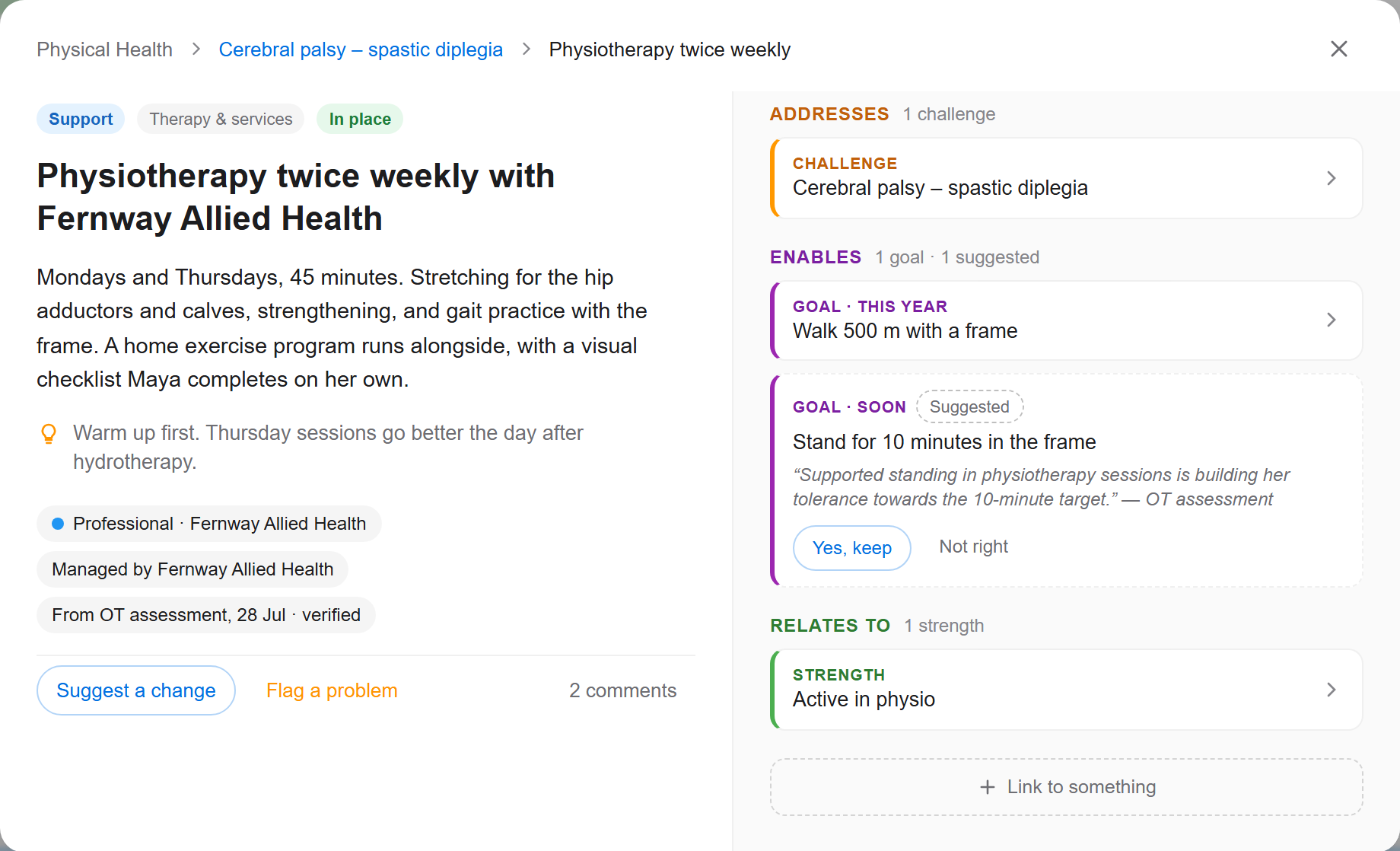
Open any one thing and you can see what it connects to. Fabricated demo participant.
Nothing in there is a loose list. Open a support and it tells you which challenge it addresses, which goals it makes possible, and which of your own strengths it draws on — so a new worker can see why something is there, not just that it is. Anything an AI pulled out of an uploaded report arrives as a suggestion, quoting the sentence it came from, and waits for a person to accept or reject it.
This is the part you genuinely control
Owning your data means something specific here: you decide which providers are connected to you, and disconnecting one ends their access immediately — no request, no waiting.
You connect people deliberately
A provider can ask to connect, but nothing happens until you agree. Until then they see nothing.
Connected means properly connected
When you connect a provider, they can see your profile — all of it. It isn't sliced into partial views, because a support worker acting on half a picture is how people get hurt. If you don't want someone to have that, don't connect them.
Disconnecting is immediate
Remove a provider and their access stops there and then. It takes effect immediately and needs nobody else's approval. What they already wrote stays in the record — you can still see it, and so can the people still supporting you.
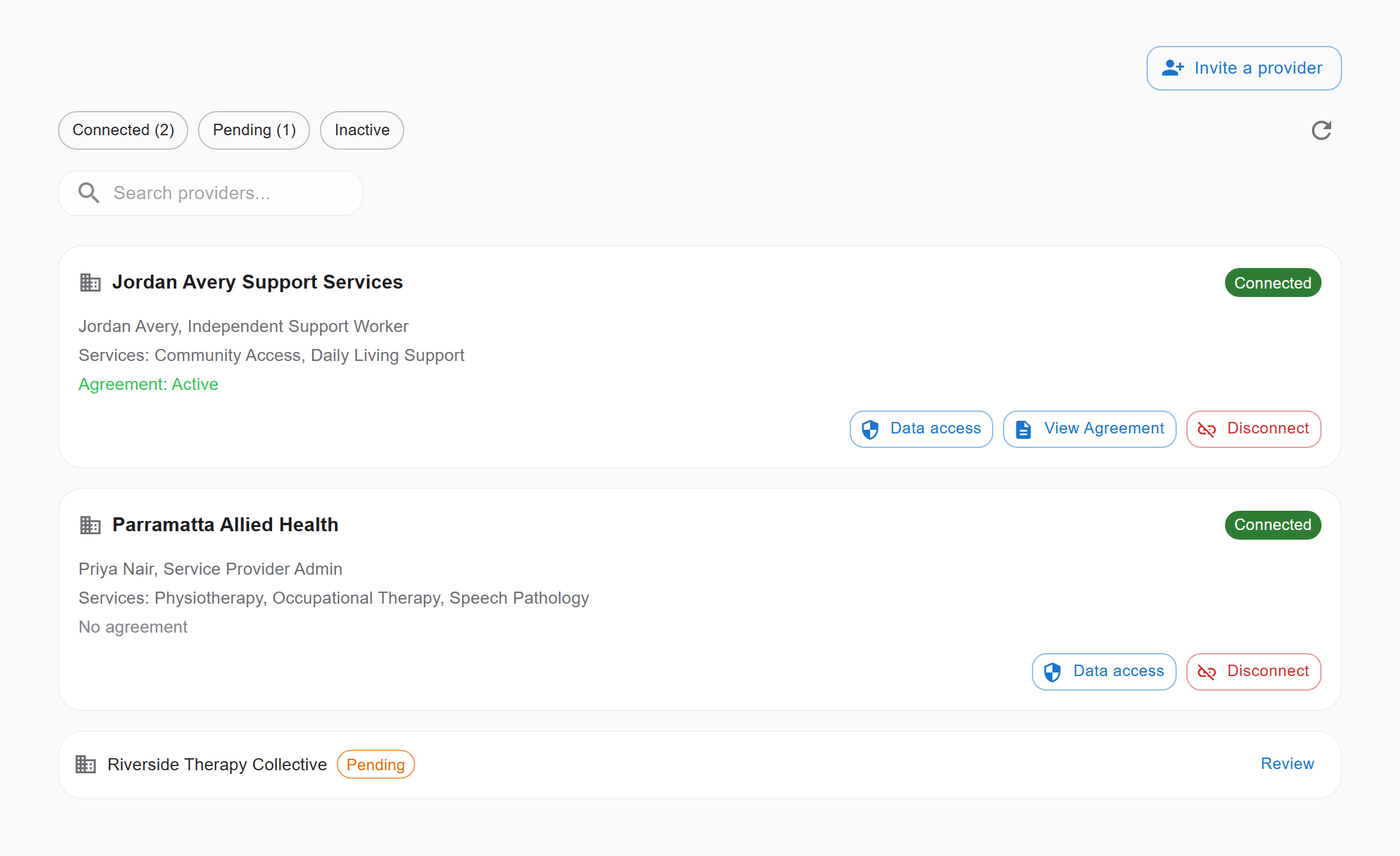
Two providers connected, one still asking. Disconnect sits on the card itself, next to Data access. Fabricated demo participant.
Because you control connections yourself, more than one provider can support you at the same time without either of them having to arrange it between themselves. That's the way the NDIS is supposed to work, and the software should get out of the way of it.
Holding an account with someone, or for them
Guardianship isn't one thing, so the platform doesn't treat it as one. The level of authority is set per account and can sit anywhere from full control to simply being able to look.
Participant keeps controlGuardian holds control
Supported decision-making
The guardian supports; the participant keeps the authority. For people who want help thinking it through, not someone deciding for them.
Informal family arrangement
No court order, just family who help. Usually view-only or narrowly limited, and recorded as informal so nobody mistakes it for legal authority.
Co-decision
Both people have to agree. An action the guardian takes waits for the participant to approve it before it goes anywhere.
Limited to certain areas
Authority is restricted to specific domains — medical, financial, accommodation, services, personal or legal — and stops at the edge of them.
Parent of a minor
For participants under 18, with the access level set to suit their age.
Full authority
The guardian acts across everything. Used where there's an adult guardianship order in place.
What a guardian does on someone's behalf is logged
Not "logged" in the sense that it can be quietly tidied up later. The parts of the platform that write the log are only allowed to add to it, never to edit or delete it, and a copy is archived daily to locked storage. If you're a participant, that's your evidence trail. If you're a guardian acting properly, it's your protection.
The things you'd otherwise have to ask for
Invoices
What your workers have billed, for what, and when — visible in your account rather than sitting in their system.
Service agreements
The terms you've agreed with each worker, including what you signed and when.
Your schedule
Appointments and supports coming up, so you can see your week in one place.
Goals & progress
What you're working towards, and whether it's moving.
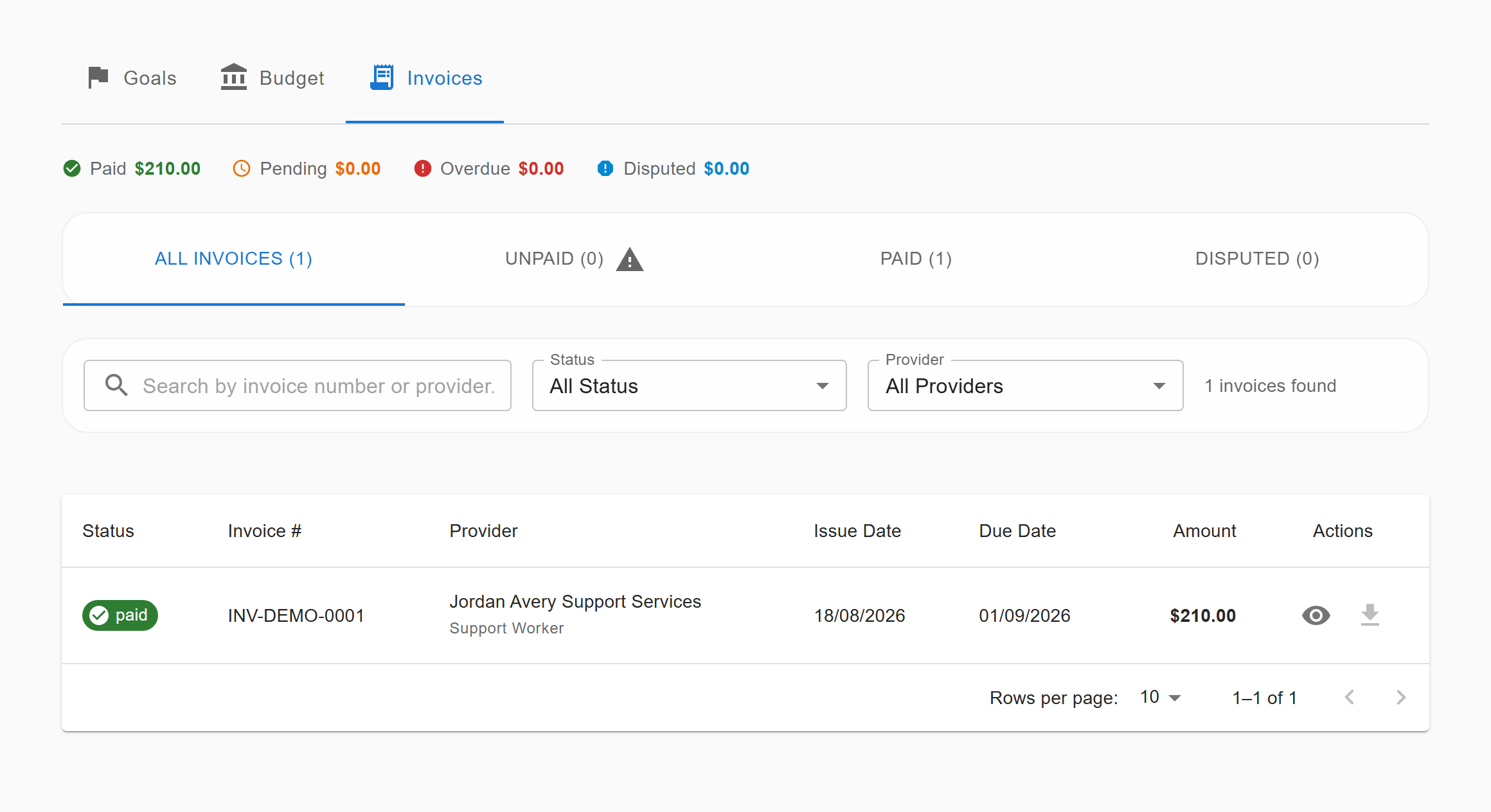
Invoices as the participant sees them — not as a PDF someone emails you later. Fabricated demo participant.
If it isn't usable, it isn't finished
We build to WCAG 2.1 AA, design for phones first, and support easy-read versions of profile content so information can be written twice — once in clinical language for the people who need that, and once plainly for the person it's about.
That's the standard we hold ourselves to, not a claim that we always hit it. If something here or in the app is hard for you to use, we'd genuinely like to know — hello@centre4ds.com.