
In development
Run the organisation on the same record your workers use.
Rostering, compliance, timesheets, award-based pay and NDIS claiming — sitting on top of the same participant profiles and session records your staff already work from, rather than in a separate system that has to be reconciled with them.
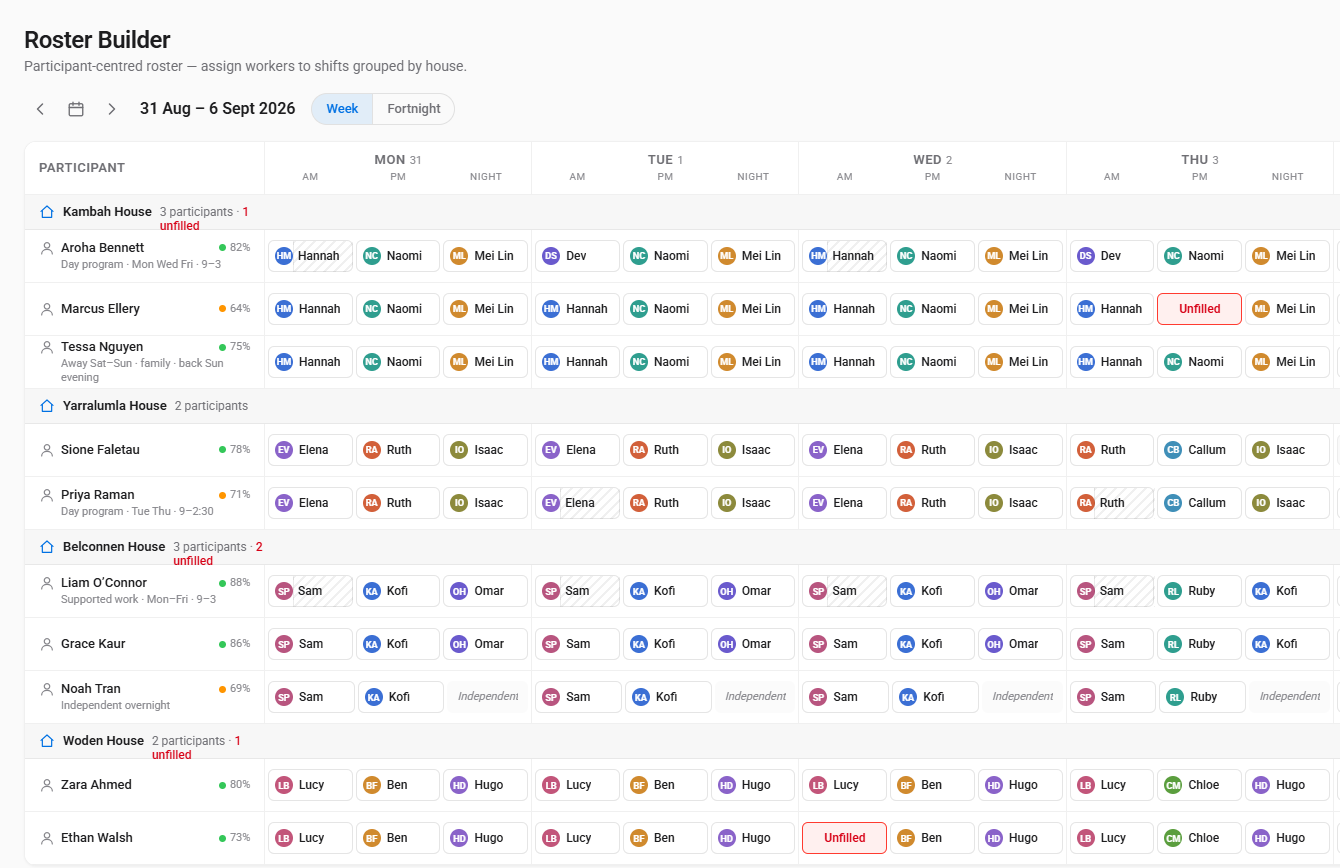
Four houses, ten residents, and who is on for every part of every day — including the slots nobody is being paid for. Fabricated demo organisation.
The thing that's good for them turns out to be good for you
CDS gives the participant their own account and lets you connect to it. That sounds like a constraint. In practice it solves three of the most expensive problems a provider has, because the fragmentation everyone complains about costs you at least as much as it costs them.
The profile is already written
You're rarely the first service in someone's life. When you connect, the profile is already there — built up by the participant, their family and everyone else supporting them. You're not the fourth organisation to ask the same intake questions and get a thinner answer each time.
Knowledge outlasts your staff
Sector turnover is brutal, and what a good worker knew usually walks out with them. Here it was written into the participant's record as they went, so the person replacing them starts informed instead of starting again.
Consent is evidence, not filing
Every connection is granted explicitly by the participant and time-stamped, and every action taken on their behalf is logged. The record you'd have to assemble for a Practice Standards audit is a by-product of how the system works, rather than a folder somebody has to maintain.
And the part that sounds like a risk: a participant can disconnect you at any time. That is genuinely their call — but the work you did stays in their record and remains claimable, and in practice a person who trusts the system with their information is a person whose file is worth reading. A record people actually engage with is better data to work from than one they've never seen.
Filling shifts is the easy half. Filling them legally is the hard half.
Anyone can put a name in a slot. The work is making sure that person is qualified, available, rested, not in overtime, and actually suited to the participant they're being sent to.
Worker profiles
Employment details, award classification, and qualifications with expiry dates tracked — so a lapsed certificate surfaces before it becomes an audit finding rather than after.
Availability & leave
Worker availability patterns and leave requests, with leave balances tracked as a running ledger rather than a number somebody maintains by hand.
Shifts & templates
Recurring shifts, templates, bulk import and a cost preview before you publish, so you see what a roster costs while you can still change it.
Participant-centred rosters
Supported independent living (SIL) houses and participant-based shift slots, so the roster is built around the person's week and their support ratios rather than around staff convenience.
Compliance checks
Rest periods between shifts, skill matching, and qualification currency validated as the roster is built — with an audit trail of what was checked and when.
Time & attendance
Clock in and out with location capture, timesheets built from real events, and exceptions raised where the shift as worked doesn't match the shift as planned.
From the shift that happened to the money, both directions
A completed shift is two financial events at once: something you owe a worker, and something you claim from a plan. Most organisations run those through separate systems and reconcile them afterwards. Here they come from the same record.
SCHADS interpretation → pay run → bank file
Service delivery report → batch → reconcile
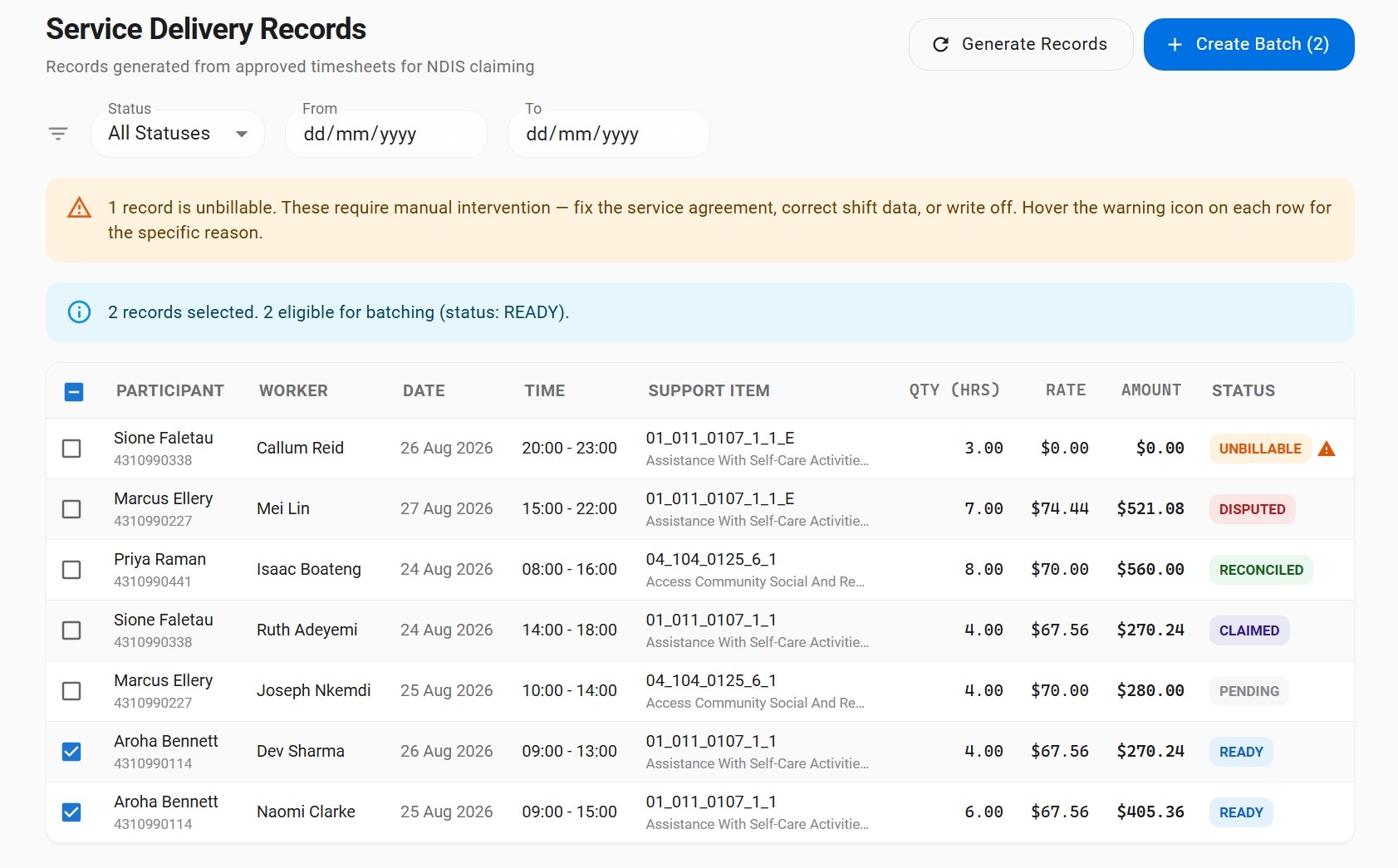
Every delivered shift as a claimable line, each with its support item and status — the ready ones ticked and counted for a claim batch, and the one that can't be billed flagged with the reason rather than silently dropped. Fabricated demo organisation.
- SCHADS award interpretation (Social, Community, Home Care and Disability Services) — penalties, allowances, broken shifts and overtime calculated from the shift as actually worked
- Pay runs with corrections, and payroll file generation for your banking
- NDIS claiming — service delivery reports, batching and reconciliation
- Approved timesheets flow into both pay and claims without re-entry
Roles, boundaries and the words you actually use
Role-based access
Admins, managers, practitioners, support workers and support coordinators each see what their role needs. Support workers complete the forms assigned to them; practitioners assign them and produce the reports.
Your organisation is your own
Every query is scoped to your organisation. Staff reach the participants they're assigned to, and nothing crosses an organisational boundary without a participant having connected you.
Call people what you call them
Customers, clients, participants — set the terminology once and the interface uses your words throughout, while keeping formal NDIS language where it legally belongs.
Talk to us early
The rostering, payroll and claiming systems are built and running in our development environment. If you run a provider and want to be in the pilot, or you have compliance questions you'd want answered before you'd consider it, we'd like to hear from you now rather than later.